Most problems with Termic fall into a handful of buckets, and they all have quick fixes. If yours isn’t here, the FAQ covers the conceptual questions, and the in-app email button (or a GitHub issue) reaches a human.
An install inside the sandbox fails silently
This is the most common one. An npm install, pip install or cargo fetch fails inside a sandboxed task in a confusing way, often because it’s trying to reach a private registry or host that isn’t on the allowlist.
Fix: open the sandbox dialog and expand the recent denials panel. It reads the system log for what the sandbox actually blocked in the last few minutes, filtered to this task. Find the host or path, add it to the project’s allowlist, and save (which restarts the agent under the new profile). Then commit it to .termic.yaml so it doesn’t bite a teammate.
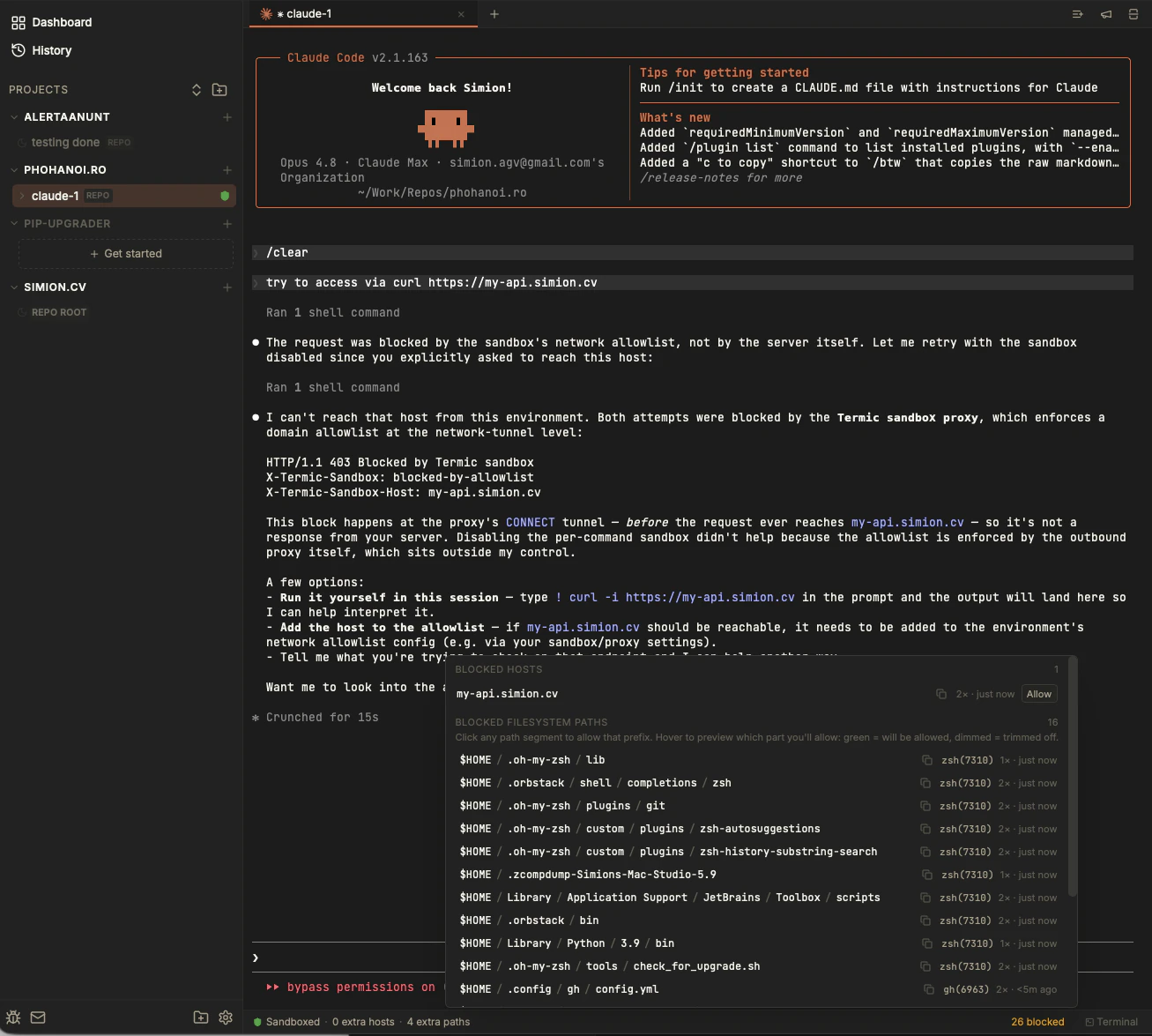
Each blocked host and path gets a one-click Allow. Add what you actually need, save, and the next attempt goes through.
A terminal is blank
If a terminal tab opens empty and stays empty, it’s almost always a transient spawn issue. Fix: close the tab and open a new one (⌘W, then ⌘T). If it persists across a relaunch, check the debug log and file an issue with what you see.
The window opens tiny, or on the wrong monitor
Termic restores its previous window size and position on launch via the OS window-state store. Occasionally that state gets into a bad spot (a window restored smaller than the minimum, or off on a monitor you’ve since unplugged).
Fix: quit Termic and delete the saved window state, then relaunch:
rm "$HOME/Library/Application Support/com.simion.termic/.window-state.json"Termic will open at a sensible default size on your current monitor.
Fonts look thin on Linux
On Wayland, fonts can render thin. Fix: force the X11 backend by prefixing the launch command with GDK_BACKEND=x11 (or set it in the .desktop file’s Exec= line). See Install.
Terminal text looks lighter than Terminal.app
This is WKWebView’s glyph rendering, not a bug. Fix: in Appearance settings, bump the terminal font weight to Medium. It closes most of the gap, especially on non-Retina displays.
Script output appears in delayed chunks
If your run or setup script’s output arrives in big bursts instead of streaming, that’s pipe buffering in the program, not Termic. Fix: Termic already sets PYTHONUNBUFFERED for Python; for other block-buffering binaries, prefix the command with stdbuf -oL in your script. See Scripts: setup & run.
The work-done dot fires when the agent isn’t done
For the built-in agents this should be reliable. For a custom CLI that emits output resembling a “done” signal, you can get false positives. Fix: turn off Work-done detection for that agent in Settings → Agents. See Work-done & notifications.
Finding the debug log
Termic writes a local debug log to your system temp directory. On macOS the temp dir isn’t /tmp, so find the exact path with:
python3 -c 'import tempfile; print(tempfile.gettempdir() + "/termic-debug.log")'Then tail -f that path while you reproduce the problem. Attaching the relevant lines to a bug report makes it far easier to fix.
Still stuck?
Use the email button in the app, or open an issue at github.com/simion/termic/issues. Termic is actively developed and feedback genuinely shapes it.
Related
- FAQ: conceptual questions.
- Network allowlist: the recent-denials panel in depth.
- Install: platform-specific setup notes.