Reading code an agent just wrote means following symbols: what is this, who calls it, where does it come from. Termic does that with the same language servers a full IDE uses, from your own toolchain, and starts nothing until you ask it to.
Turning it on
Open a file in a language Termic can serve and a compass button appears above the editor. Click it and you get two choices:
- This task: navigation for this checkout, for now. The server stops when the checkout’s last task is closed or archived.
- Always for this project: the same, plus every future task on this project starts with it on.
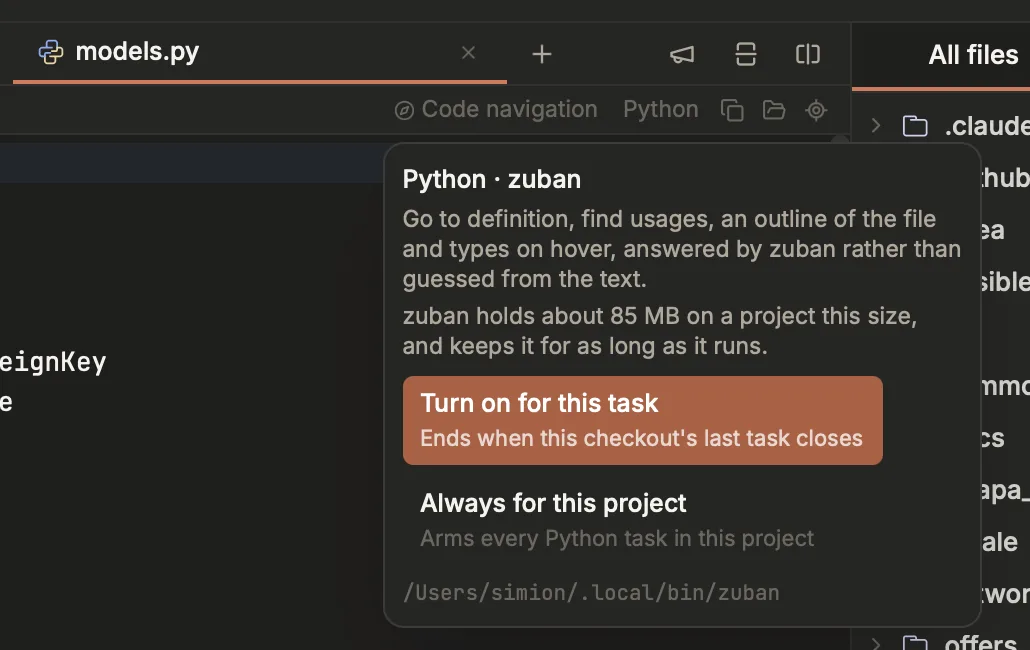
The compass button above the editor. It names the server that will actually run and what it holds, and offers the two scopes: this task, or every task on this project.
Before the first server starts, Termic tells you what it will cost: a language server holds its index in memory and does not give it back while it runs, and the figures are real (about 300 MB for TypeScript, around 3 GB for rust-analyzer on a large repo). You agree once per machine, not once per repo.
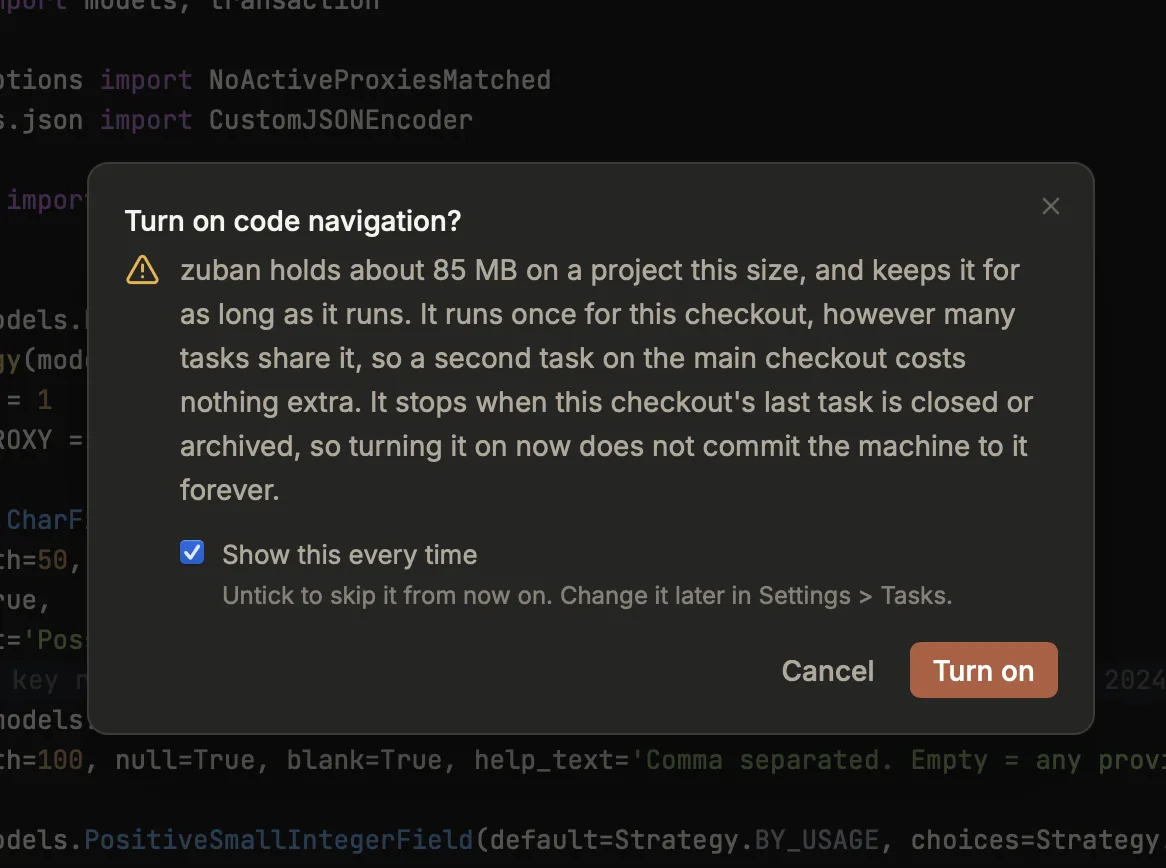
A real figure for the server that is about to start, not a generic warning. Untick the box and the second project is one click.
Nothing runs in the background, nothing is bundled in the app, and nothing is downloaded without a click.
What you get
| Go to definition | F12, or ⌘-click the symbol |
| Find usages | ⇧F12, or ⌘-click a definition |
| Go to implementation | ⌥⇧B |
| Go to type definition | ⌥⇧T |
| File structure | ⌘F12 |
| Back / Forward | ⌘[ / ⌘] |
| Search everywhere | double-tap ⇧ |
Hover a symbol for its type and documentation. Completion comes from the server, so it can offer .objects on a Django model rather than only the words already on screen.
⌘-click is one gesture with two meanings, which is the JetBrains behaviour people miss most: click a usage and you jump to the definition; click the definition and you get its callers. A symbol nobody calls says “No usages” rather than doing nothing.
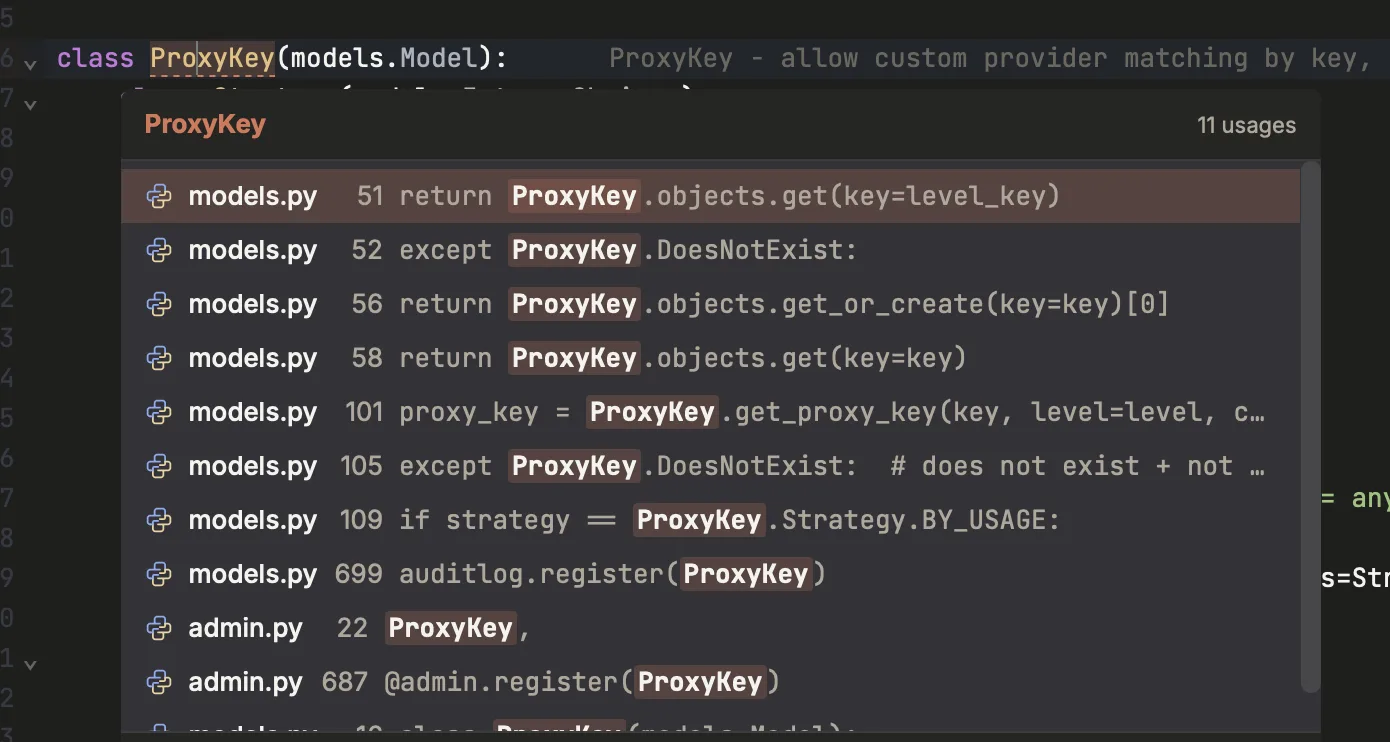
⌘-clicking the definition of ProxyKey asks who uses it. The list floats at the symbol rather than taking over a panel, and each row jumps to that line.
Definitions outside your checkout open too, read-only: a class in site-packages or node_modules is a click away. When the definition lands in a stub file (a .pyi full of ...), Termic hops to the source it describes, because a wall of ellipses is the right answer to “what is the type” and the wrong answer to “show me this code”.
Search everywhere (double-tap ⇧) searches file names always, and classes and functions too once a checkout has navigation on. Definitions rank above imports of them, and prefix matches above substring matches, so Store finds the class rather than the twenty files that import it.
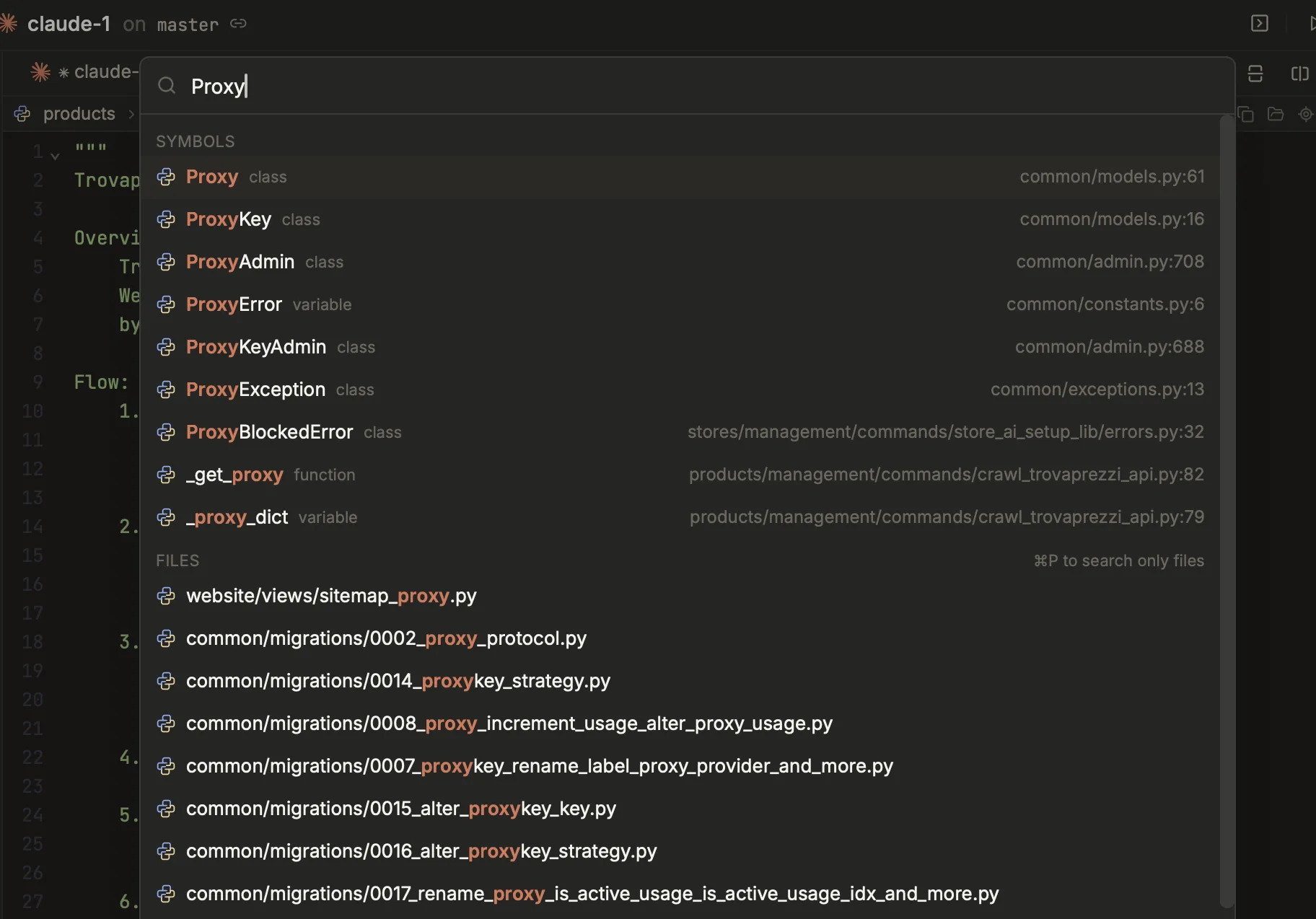
Double-tap Shift. The Proxy class comes first, ahead of the longer names that also match and the twenty files with “proxy” in the path.
The languages
| Language | Server | Where it comes from |
|---|---|---|
| TypeScript, JavaScript, TSX | tsgo (TypeScript 7) | your repo’s node_modules, your PATH, or Termic downloads it |
| Python | zuban, ty or basedpyright | your .venv, your PATH, or Termic installs one |
| Rust | rust-analyzer | your rustup toolchain, your PATH, or Termic downloads it |
| Go | gopls | your PATH (go install golang.org/x/tools/gopls@latest) |
| C, C++, Objective-C | clangd | ships with the Xcode Command Line Tools; apt install clangd on Linux |
| Swift | sourcekit-lsp | ships with the Xcode Command Line Tools, or the Swift toolchain |
| Ruby | ruby-lsp | your project’s binstub, or gem install ruby-lsp |
A copy inside your project always wins over anything else, because a repo that pins its own toolchain has already made the decision.
Downloads are pinned to a version, verified against the checksum the upstream release publishes, and unpacked into Termic’s own folder. They are never added to your PATH, and deleting Termic deletes them.
Choosing a different server
Some languages have more than one good server, and the right one depends on your project. Python is the clearest case: on a Django codebase with no stubs installed, zuban types Model.objects correctly while the others report it missing.
Settings → Editor → Language servers lists every server for every language, which ones this machine already has, and lets you pick:
- Automatic uses Termic’s order (the one in the table above).
- Pick one and that is what starts.
- Custom command runs a binary Termic does not ship at all:
pyright-langserver --stdio,solargraph stdio, a wrapper script in your repo. It is run as typed, with no shell.
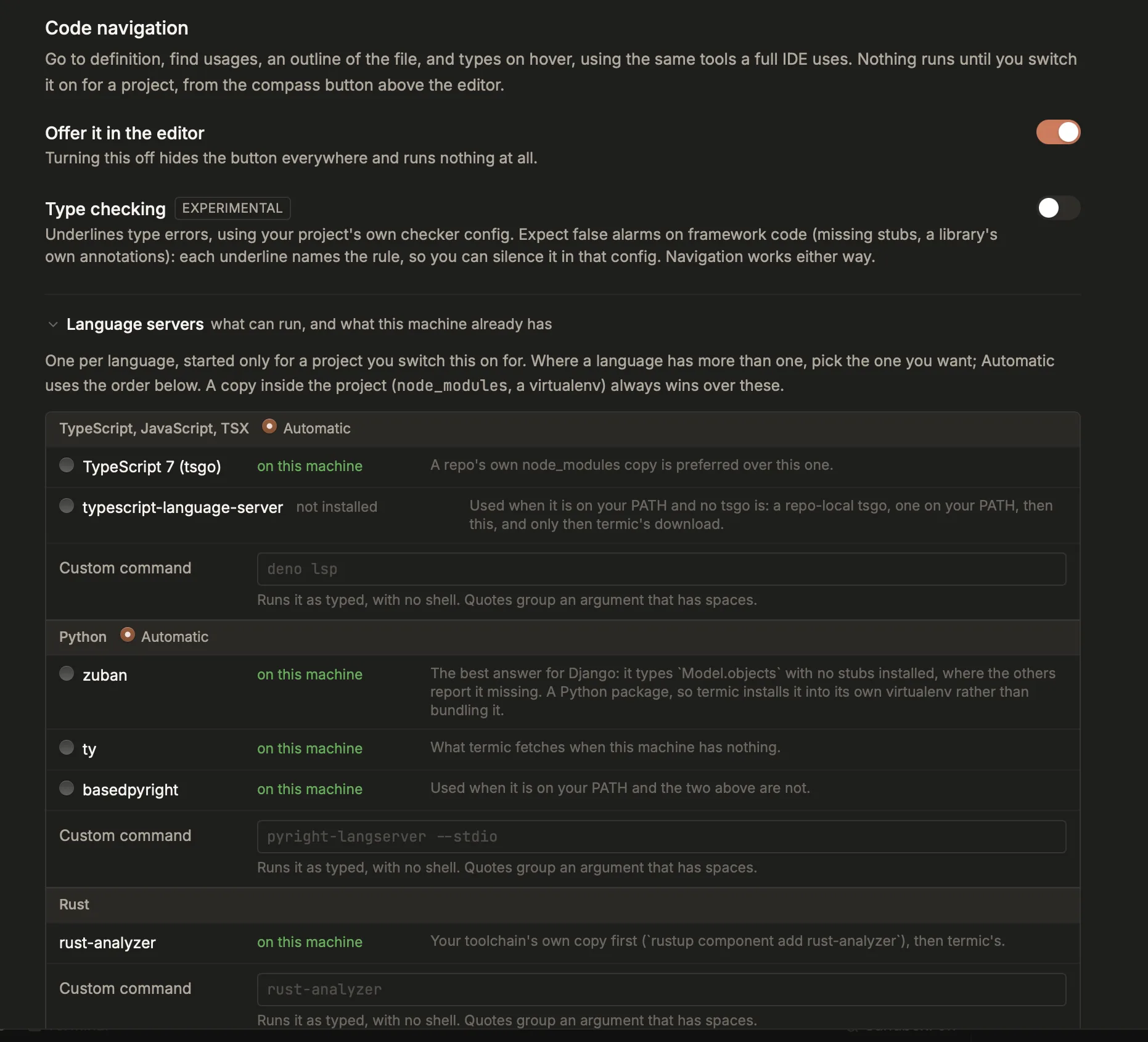
Every server for every language, which ones this machine already has, and what happens if you pick one. The custom command field takes a binary Termic does not ship at all.
Every project can override the machine setting from its own settings page, so “this repo needs pyright” does not change what your other repos use.
Changing any of it stops what is currently running, so the new choice takes effect immediately rather than at the next relaunch.
Type checking (experimental)
Navigation is the product; type checking is a separate switch, off by default, in Settings → Editor.
A type checker reads your project the way its own config tells it to, and most projects have never written one. On a large framework codebase, some of what it underlines is about missing type stubs, a library’s own annotations, or a rule you would have turned off. That is why it ships off and is labelled experimental.
When it is on, every underline names the server and the rule that produced it (zuban [assignment]), so you can look one up or silence it in your project’s own checker config. Navigation works exactly the same either way.
When the answers look wrong
Termic tells you when the problem is the environment rather than the code, before you conclude the feature is broken:
- A Django project with no
django-stubsinstalled, where every model query looks undefined. - A TypeScript project whose only
tsconfig.jsonis one a framework generated somewhere else, so path aliases and generated globals read as missing. - A C or C++ project with no
compile_commands.json, where clangd has to guess your include paths. - A Ruby project with a
Gemfileand noGemfile.lock, where ruby-lsp refuses to start at all. - A Swift package that has never been built, so there is no index to answer from.
Each one says what is wrong and the one command that fixes it.
What it costs, and when it stops
One server per checkout per language, however many tasks share that checkout. It starts when you open a file it can answer about, and stops three minutes after the last editor on that checkout closes. The permission itself lapses when the checkout’s last task is closed or archived, so a five-minute code read cannot resurrect a multi-gigabyte server months later.
Live servers appear in the Activity monitor with their real memory use, and can be stopped from there.
Related
- Editor & diff viewer: the editor these jumps move around in.
- File finder & search: finding files and text, which needs no server at all.
- Keyboard shortcuts: the full key reference, including rebinding these.
- Settings reference: where the servers and the type-checking switch live.