Agents work in turns: you send a message, it does the work, it stops and waits. If you already know the next three things you want it to do, sitting there to send them one at a time is busywork. Termic’s message queue lets you schedule the next prompts ahead of time, repeat a prompt across several turns, or run a bounded Ralph-style loop that keeps an agent moving through a task list until the queue drains or you stop it.
This is turn-based scheduling, not wall-clock scheduling: queued messages send when the agent finishes its current turn. That makes it useful for Claude Code, Codex, Gemini and any other CLI where “send the next instruction after this one completes” is more important than “send this at 3:00 PM.”
How it works
Open the queue for an agent and you get a simple flow:
- Type a message and Add to queue. Repeat for as many steps as you want; the queue shows them in order with a live count.
- Set Repeat if the same prompt should be sent several times.
- Hit Start. The first queued message sends immediately. Each time the agent reports it has finished a turn, the next message sends on its own.
- Send now fires the next queued message right away, skipping the wait for the agent to finish its current turn, for when you want to nudge it ahead manually.
- Stop at any time to halt the queue, and Clear all to empty it.
The tab shows a small “N queued” indicator so you can see at a glance that an agent is working through a list.
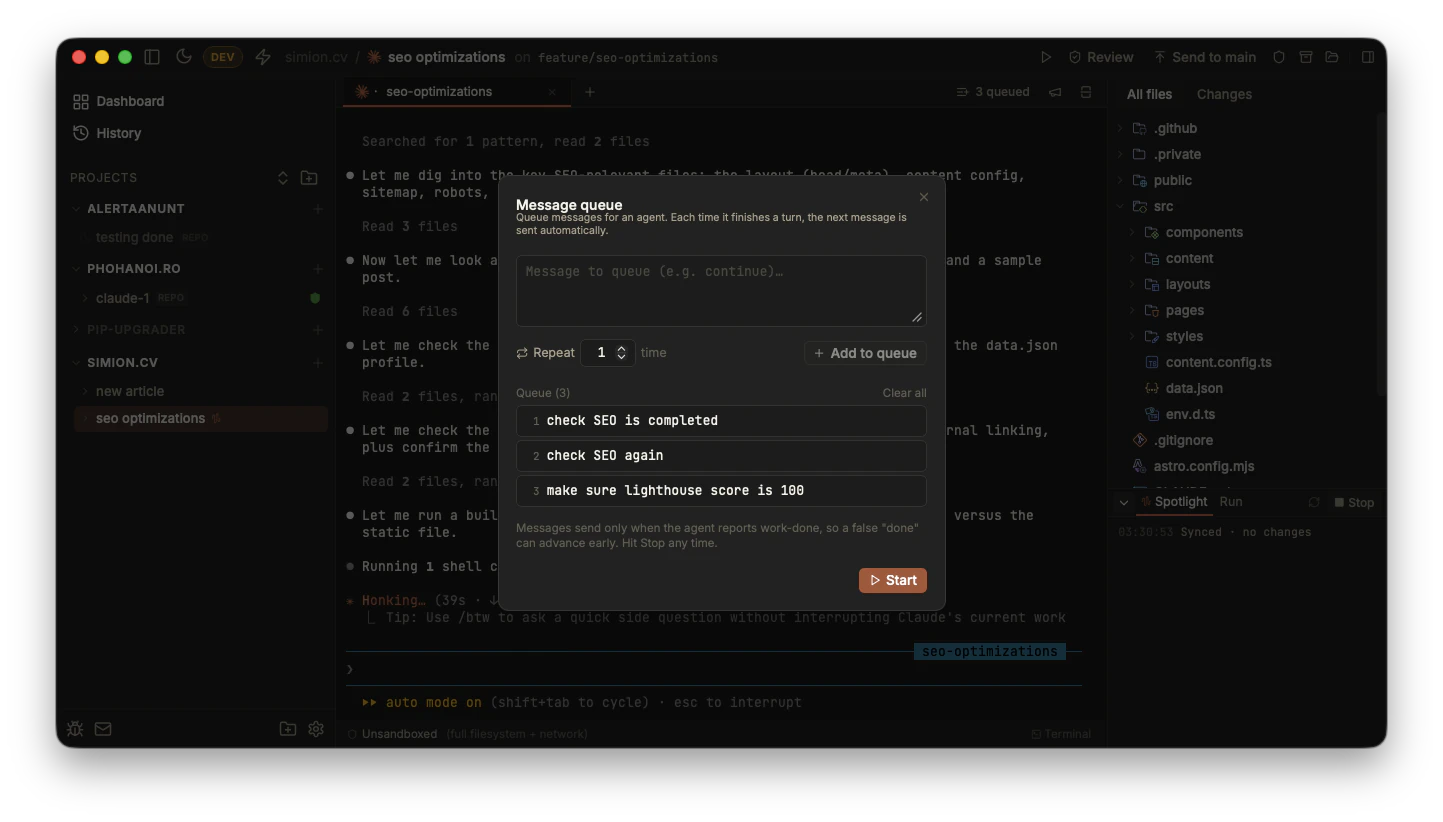
Queue up a multi-step plan; each message sends when the agent finishes the previous turn.
Scheduled follow-ups
The safest use is a finite checklist: give the agent one instruction, then schedule the follow-up checks you already know you want.
For example:
- “Implement the settings export.”
- “Run the test suite and fix failures.”
- “Review your diff for accidental unrelated changes.”
- “Update the changelog and summarize what changed.”
Each message waits for the previous turn to finish before it sends. The queue is per-agent, so two agents can each run their own follow-up list in the same task.
Repeated messages
Next to the input is a Repeat count. Set it to N and the message is added to the queue N times. It’s the quick way to build a “keep going” loop: queue continue five times and the agent gets nudged onward five turns in a row without you typing it each time.
This is intentionally bounded. Termic does not create an infinite loop by default; you choose the maximum number of repeats, then stop early if the agent finishes before the queue drains.
Ralph-style loops
A Ralph loop is the long-running agent pattern where the same prompt keeps getting fed back to a coding agent so it can work through a task list over many iterations. In Termic, the practical version is a repeated, completion-triggered message:
Read TASKS.md. Pick the first unchecked task.
Implement it, run the relevant tests, and mark it done.
If all tasks are complete, summarize the result and stop.
Otherwise, prepare for the next queued turn.
Add that prompt with a repeat count high enough for the task list. Each iteration starts only after the agent finishes the previous one, so the loop has real backpressure instead of blasting prompts into a busy terminal.
A configurable minimum send interval (Settings, General; default 10 seconds) throttles the loop so queued messages cannot fire too fast, even when turns complete in quick succession.
The important distinction: Termic gives you a supervised Ralph-style loop, not a hidden background daemon. You can see every terminal turn, pause the queue, clear it, inspect the diff, or kill the agent.
It rides on work-done detection
This is the one thing to understand before you trust it with a long queue: a queued message only sends when Termic detects the agent has finished its turn. That detection is the same work-done signal the blue dot uses, and it’s reliable for the built-in agents. But a false “done” (most likely on a custom CLI whose output trips the detector) can advance the queue early, sending the next message before the agent was actually finished.
So: for claude / codex / gemini the queue is dependable. On a custom agent that produces false positives, either turn off work-done detection for that agent or keep an eye on the queue. Either way, Stop halts it instantly.
When to use it
- Multi-step plans. “Implement the feature”, then “write tests”, then “update the changelog”, queued so the agent flows through them.
- Scheduled follow-ups. Send “review your diff” or “run the browser smoke test” only after the implementation turn ends.
- Repeated prompts. Repeat
continueor a task-list prompt to push a long task forward without babysitting each turn. - Ralph-style loops. Keep an agent cycling through
TASKS.mdor a PRD while preserving a visible stop button and review path.
Related
- Work-done & notifications: the signal the queue advances on.
- Broadcast: the opposite shape: one message to many agents at once.
- Agents & the registry: the per-agent work-done toggle for custom CLIs.
- Prompt library: saved prompts that queue themselves when an agent is busy.