Most people who run agents all day end up with more than one login: a work subscription and a personal one, or two accounts for two clients. Termic lets an agent hold several named credential sets, lets each task choose which one it runs as, and can move a task from one to the other when the first runs out.
This shipped in 1.3.0 and is off until you name a second account.
Termic never handles your credential
This is the constraint the whole feature is built around, and it is worth stating before anything else.
Termic does not read, copy, store, export or back up a credential. Adding an account creates an empty directory and points the agent’s own configuration variable at it. You then run the agent’s own login, in its own terminal, exactly as you would have anyway, and the agent writes its own credential into that directory.
That means there is nothing to import, nothing to migrate, and no vault for someone to compromise. It also means a new account is genuinely signed out until you sign in, which the interface says rather than hides.
The first name is the login you already have
Naming your first credential set does not create one. You already had a login; this is the name you are giving it.
So the first step asks for two names at once: one for the account the agent is using right now, and one for the new account. That pairing is the entire point. Naming only what you already have leaves you with one account and no second, and Termic would then have to tell someone whose agent works perfectly that they are “not signed in”.
The account you already had relocates nothing. It keeps using the agent’s ordinary configuration directory, so an install that adopts a name and stops there is byte-for-byte what it was.
Which agents can do this
The answer is a table of measurements against real CLIs, not a guess, because the trap here is silent. Several agents keep the token in the OS keyring and only the settings in the configuration directory. Whether moving that directory actually separates two logins depends entirely on how the keyring item is keyed.
| Agent | Second account | Notes |
|---|---|---|
| Claude Code | Yes | Full support, including usage and automatic switching. |
| Codex | Yes | Full support, including usage and automatic switching. |
| Antigravity / Gemini | Yes | Termic always starts it with file-based credential storage, which is what makes the separation real. |
| Grok | Yes | Host only. Its binary lives inside the directory it moves, so a container cannot mount it. |
| opencode | Yes, with a caveat | It rides a generic XDG root that other tools in the same environment also read. Termic says so in the interface rather than presenting it as agent-local. |
| pi | Yes | |
| GitHub Copilot | No | Its login sits in the OS keyring under one fixed name, so a second set would share the same credential. Use its own /user switch. |
| Muse Code | No | Its credential is in the keychain and Termic has not confirmed a second set would get its own, so it does not offer one yet. |
The dangerous case is the one Termic refuses. An agent with a fixed keyring name looks like it worked: point it at a new directory, it finds no settings and asks you to sign in. Sign in, and the token lands back in the same shared slot, and your two “accounts” are now one account. Rather than ship an override that appears to work, those agents get no control and a sentence saying why.
A second account is not a second setup
An account owns its credential and nothing else. Everything that is not a credential is shared back to your main configuration by symbolic link, at the moment the account is created:
- your settings and permissions,
- your instructions file (
CLAUDE.md,AGENTS.md), - your skills, commands and prompts,
- your conversation history and transcripts.
So switching accounts changes who you are signed in as, not who your agent is. Without that, a second account would be a blank agent with no instructions, no permissions and no history, and switching to it mid-task would throw away the conversation, which is the exact thing the switcher exists to protect.
Where to find it
Three places, each at the moment it is relevant:
- Settings, Agents. The canonical place. Each agent’s card carries its credential sets at the top: who this is signed in as reads before how it runs.
- The task footer. Once an agent has more than one account, the footer chip names the one the task is running as. Click it for the switcher, the plan usage and the automatic-switch option, all in one panel.
- The usage popover, which offers to add a second set at the point where you are looking at a number that is nearly spent.
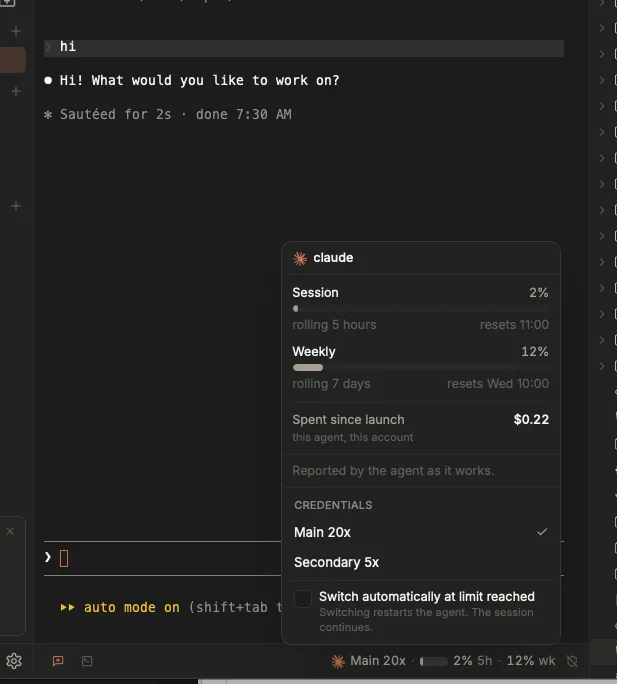
One chip, one panel: the numbers, the account they belong to, and the switch, including the automatic one.
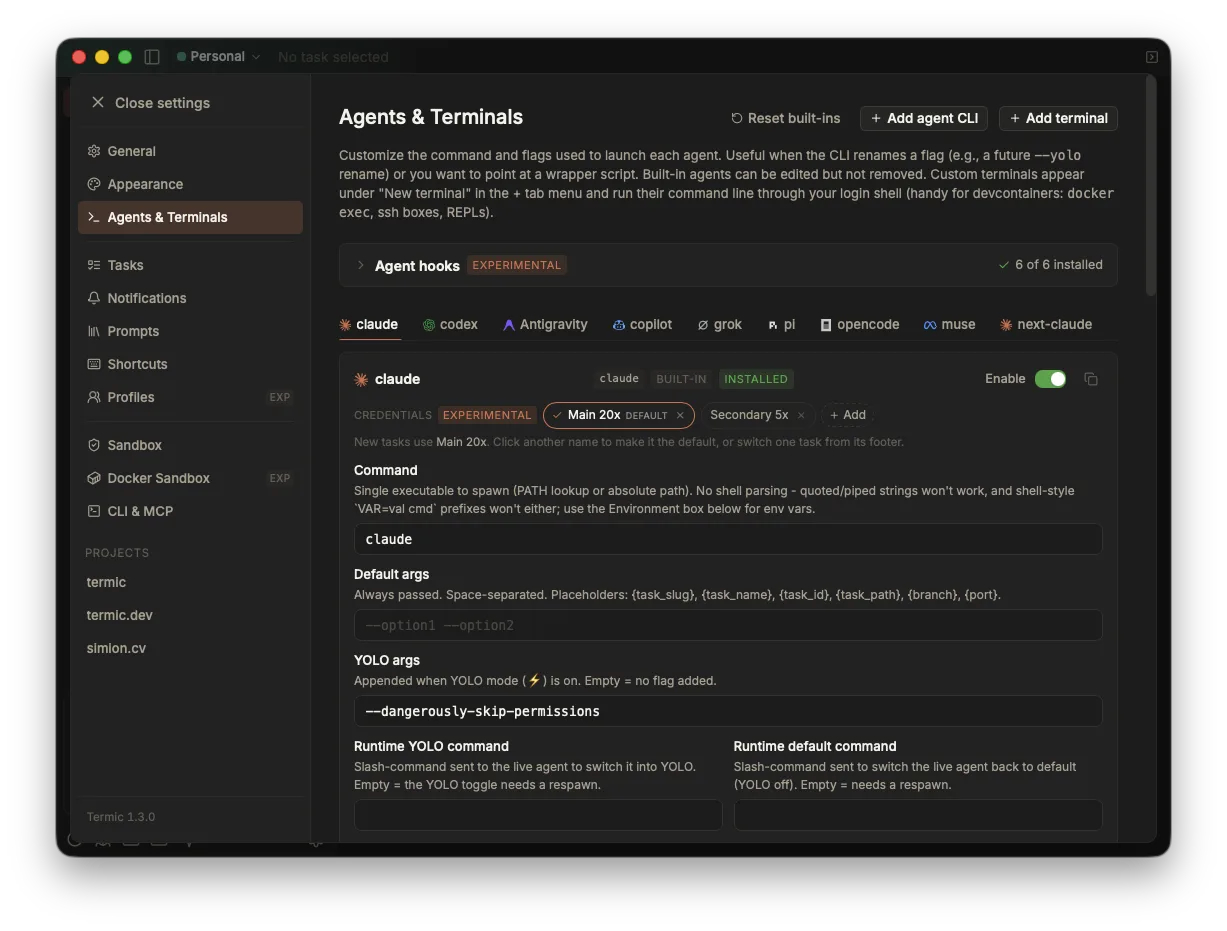
Each agent’s card carries its credential sets at the top, before the fields that say how it runs.
Scoping: which profile offers what
The account list and the default live on the agent’s entry in settings, so they are per profile automatically. A work profile can default to a work account while a personal one defaults to yours.
The logins themselves are machine-wide, keyed by the name you gave them. Two profiles that both offer an account called “Work” address the same login, so signing in once covers both. A profile does not own logins; it owns which names it offers and which is default.
The same rule means names are frozen once created. For Claude the store path is hashed into the keychain item’s name, so renaming would move the directory, change the hash, and log that account out of a credential that is still perfectly good. Remove and add instead, which is honest about costing one sign-in.
Signing a new account in
A new account starts signed out, because Termic made an empty directory and nothing else. Only the agent’s own login can fill it.
The catch is that the agent in front of you is still running on the old account, so running /login there signs the old one in again. Picking an account you have not signed into yet therefore opens a tab in the same task, titled Sign in: <name>, where the agent runs as the new account. Run its login there, close the tab, then pick the account again to move the task over.
A tab rather than a restart, because the conversation running beside it is the thing the switcher exists to protect.
Switching a task that is already running
A running process cannot have its environment changed underneath it, so a switch writes a setting and the new login takes effect on the agent’s next start.
That is honest and not much use mid-session, so Termic offers the restart. Accept it and the agent restarts on the other account and resumes the same conversation, which works precisely because history is shared rather than per account. Decline it and the change stays staged for the next start. The confirmation can be turned off once you have seen it, and re-enabled in Settings, Tasks.
While a switch is staged, the footer shows both: the account the process is running as, whose numbers are on screen, and the one it will move to.
Switching when an account runs out
For Claude and Codex, Termic can read how much of a subscription’s rolling limits the current account has spent. That makes an automatic switch possible.
It is off by default, and it is one checkbox per agent, in the panel behind the footer chip. When it is on and the account in use passes 95% of a rolling window, Termic:
- moves the task to an account it has seen headroom on,
- restarts the agent there, resuming the conversation,
- sends it “continue”, because the turn that hit the wall still has to be asked for again and nobody is at the keyboard,
- and says what it did, so the change is not something you discover by wondering why a number moved.
It will never move to an account nobody has signed into. An empty store cannot start the agent at all, so switching to it would be a downgrade from merely being near a limit. It also only moves one task: the agent’s default is untouched, exactly like a manual switch.
A task that hits a wall at 3am is still working at 4am. That is the whole feature.
Docker is a second realm
Termic’s Docker sandbox never reads the host’s configuration directory, so a login performed on your Mac is invisible inside a container. You sign in once per realm, and each realm then shares that login across every profile.
That is not a gap to work around. A container that could read the host’s credential store would defeat the point of the container.
Sandboxed agents
An account’s store sits outside the agent’s usual configuration directory, so the Seatbelt sandbox has to be told about it explicitly. Termic does that for you: the account in use is allowed for read and write, and only that one. A sandboxed agent can sign in and refresh its own token on the account it is running as, and cannot reach the others.
What about the terms of service
Holding several subscriptions is not a terms violation. What draws suspensions is routing subscription tokens through third-party clients and relay servers that impersonate the official one.
Termic runs the real CLI and never speaks to any provider’s API itself. Isolating an account with the CLI’s own documented configuration variable is the pattern vendors have publicly accepted, and it is the only mechanism Termic uses: no token is lifted out of a keychain and planted elsewhere.
Related
- Profiles: separate windows, and how they pick which account to use.
- Agents & the registry: the built-in agents and what each one supports.
- Docker sandbox: the second realm, and why it needs its own sign-in.
- Sandbox overview: what an agent can reach when it is caged.