Reviewing what an agent did is half the job, and bouncing out to another app to do it breaks the flow. Termic has a real editor and a proper diff view built in, so you can read, check and tidy an agent’s work without leaving the task.
The file tree
Each task has a file explorer with Sublime-style preview tabs: single-click a file to preview it (the tab is reused as you click around), double-click or edit to make it a permanent tab. It’s a fast way to skim what’s in a worktree without opening a dozen tabs you then have to close.
Right-click a file or folder for the actions you’d reach for: rename or remove it straight from the tree, copy its path (relative or absolute), and show in Finder. Those copy-path and reveal actions follow you across the file surfaces, so they’re also on the All Files tree, the Git panel, the diff header, and the editor breadcrumb.
The editor
Files open in a built-in editor powered by CodeMirror 6. It’s a real code editor, syntax highlighting, the keybindings you’d expect, and it’s deliberately CodeMirror rather than Monaco: Monaco was measurably slower to cold-start inside WKWebView when the choice was benchmarked, and editor-open latency is something you feel.
- Saving is explicit, with a dirty-state indicator so you always know whether what’s on screen matches disk.
- The Find / Replace panel is styled to match the rest of the app (no bevelled WebKit gradient buttons), and it never shows spellcheck or autocorrect squiggles, because file contents, paths and identifiers aren’t prose.
When an agent changes a file on disk, Termic reloads it intelligently. A file you opened in preview (temporary) mode refreshes quietly, instead of showing a false “modified” dot. A file you opened to edit asks before reloading, and only when you focus its tab, so an agent’s edits never quietly overwrite what you’re working on.
The editor is loaded lazily, so it doesn’t cost you anything until you actually open a file.
Syntax highlighting
The editor and the diff view take their grammars from CodeMirror’s own language registry rather than a hand-maintained list, which is roughly 150 languages with nothing to install or configure: .php, .lua, .zig, .hs and the next one all just work. Each grammar is a separate lazy chunk, fetched only for a language you actually open, so app start is unaffected however long the list gets.
For the .txt that is really JSON, set the syntax by hand: a language button on the editor’s path bar, or the Set syntax row in the command palette. The pick reconfigures the editor in place, so your cursor, undo history and scroll position survive it.
A file that claims nothing gets content detection (shebangs, markup declarations, real JSON), on high-confidence signals only. A wrong guess is worse than no guess.
Inline git blame
Turn it on in Settings → Appearance → Editor, or from the command palette, and the line your cursor is on gets subject, Author (age) in dimmed text after the code.
Resting on that annotation opens a card with the full commit: author, date, short SHA, co-authors and the message body. Two actions from the card:
- Open diff, which opens that commit’s diff in a real tab.
- Show in History, which jumps the commit graph straight to that SHA, even if it is tens of thousands of rows down.
It is off by default, and annotates the cursor line only. The file is blamed once and cached, so moving the cursor is an array lookup rather than a git process per keystroke.
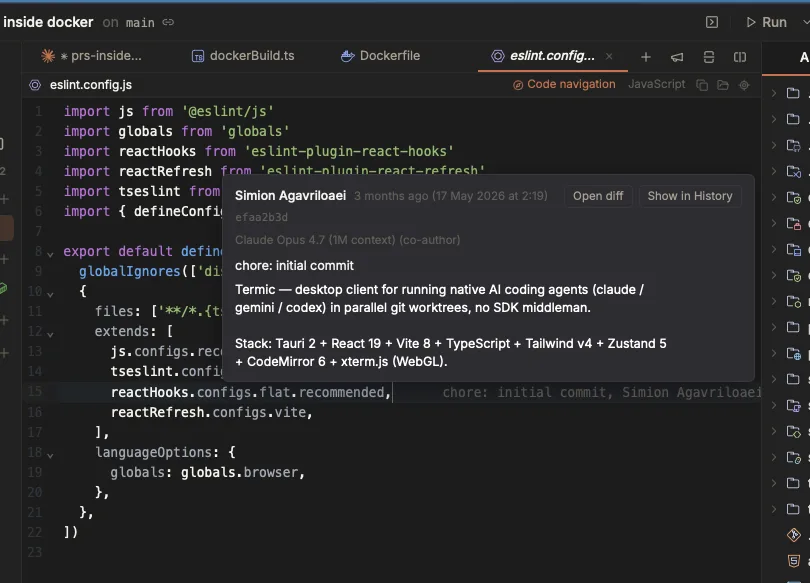
The cursor’s line only, in dimmed text after the code. Resting on it opens the whole commit, with a way into its diff or into the graph at that SHA.
Scratchpad tabs
Sometimes you want somewhere to put a note, a stack trace or a half-written prompt, and you do not want to name a file or explain it to git status. A scratchpad is an unsaved buffer that survives restarts, scoped to one task.
Open one from the tab strip’s + menu, the command palette, or ⌥⌘N. Type, and it is still there after a relaunch.
⌘Sdoes not save to the scratch store. It promotes the pad to a real file inside the task: pick a folder, pick a name, and from then on it is an ordinary edit tab.- Pads live in Termic’s own data directory, never in the worktree, so they never turn up in a diff the agent reviews.
- Quitting keeps your pads. Closing one asks first.
- Archiving a task keeps its pads.
- The tab title folds in as many buffer lines as fit, so pads are distinguishable without naming them, and the syntax is detected from what you type (or picked by hand, and remembered).
The diff viewer
The diff view shows a task’s changes against HEAD with full syntax highlighting. You can flip between side-by-side and unified layouts depending on what you’re reading: side-by-side for understanding a rewrite, unified for scanning a lot of small edits.
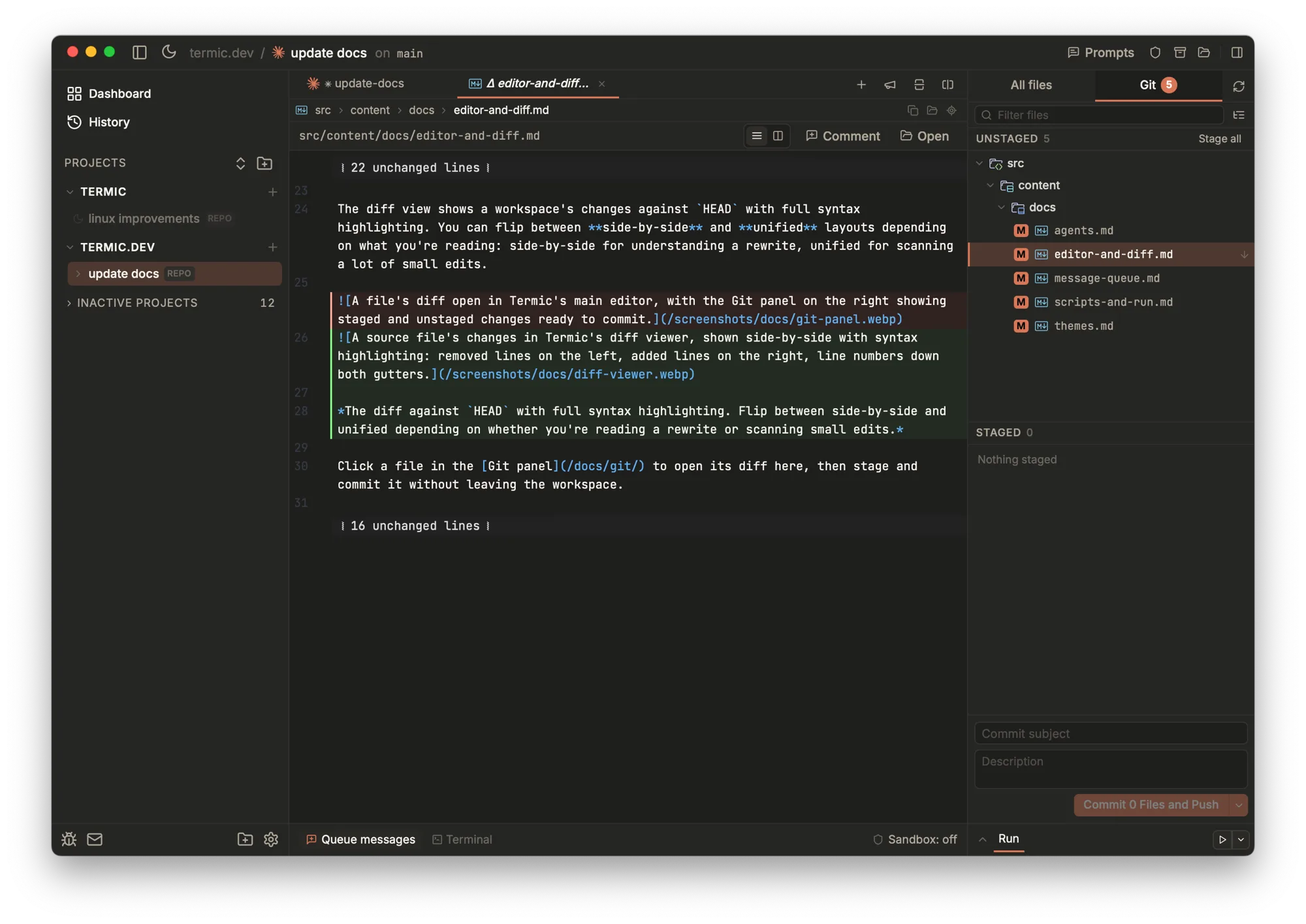
A diff against HEAD, with the unified / side-by-side toggle in the header and the changed files listed in the Git panel on the right.
Click a file in the Git panel to open its diff here, then stage and commit it without leaving the task.
The change highlights are tuned for readability: softer change highlights and even add/remove line tints keep syntax-colored code legible, so you read the code, not the background.
For multi-repo tasks, the diff is aggregated across every member repo, so you review everything the agent changed in one place instead of opening each repo’s diff separately.
Send to main
When an agent in a worktree has done something you want to keep, Send to main lands that diff in your parent checkout. It’s the bridge from the isolated worktree back to the branch you actually work on, without manually cherry-picking or merging. (Tasks on the main checkout don’t need this, they’re already in your checkout.)
When a diff goes stale
A diff tab holds what it read when it opened. If the agent keeps working while you review, that tab is now describing the past, so it says so and re-reads on demand.
This is deliberately not live-updating. Content shifting under you halfway through reading it is worse than content being slightly old; being told which one you are looking at is what actually matters.
Other file types
- SVGs open as source, preview, or split, the same toggle markdown has, so an icon is editable in the app rather than something you leave to change. The preview renders the live buffer, so a split-view edit updates as you type. SVG keeps its own default view, set to preview, so clicking one in the file tree still shows the picture.
- Images in a git diff render as before and after pictures rather than pages of binary.
- PDFs preview in a tab, and keep their page across tab switches.
- Folders in the markdown preview open as a GitHub-style listing in the same tab: rows navigate in place,
..climbs back out, and the folder’s README renders underneath. - Anything the editor cannot usefully render opens in the OS default app on double-click in the file tree.
Syntax themes
The editor and diff view support eight syntax themes, set in Appearance. They’re chosen to pair with the app’s overall theme, and there’s a live, syntax-highlighted preview in settings so you can see a theme before committing to it.
There’s also an Auto theme that matches the app palette, so a light app theme no longer shows light code on a light background.
Related
- Code navigation: go to definition, find usages and hover types in that editor.
- History & compare: where inline blame’s “Show in History” lands.
- Inline comments: commenting on what you read and sending it to the agent.
- File finder & search: jumping to the file you want to open.
- Prompt library: having a second agent review the diff.
- Themes & appearance: syntax themes for the editor.