Termic doesn’t reimplement any agent. It spawns real CLIs in terminals. The list of which CLIs it knows about is an editable registry, so you’re never limited to what shipped in the box.
The built-in agents
Eight agents are recognized out of the box and auto-detected on your PATH:
claude: Anthropic’s Claude Code.codex: OpenAI’s Codex CLI.agy: Google’s Antigravity CLI.copilot: GitHub Copilot CLI.grok: xAI’s Grok CLI.pi: the pi CLI.opencode: the opencode CLI.muse: Meta’s Muse Code.
On the welcome screen and in the new-task picker, installed agents show green and missing ones gray. You only need one. If none are installed, Termic offers a plain Terminal (a login shell) as the default so the app is still useful while you set an agent up.
Bring your own agent
Settings → Agents is a fully editable registry. Anything that runs in a terminal can be an agent in Termic: aider, ollama run, a wrapper script of your own. Adding one takes about thirty seconds.
Each agent entry has a handful of fields:
- Command: the executable to run (e.g.
aider). - Args: default arguments passed on every spawn.
- YOLO args: the arguments that skip per-action permission prompts (e.g. Claude’s
--dangerously-skip-permissions). Termic adds these automatically when a task is sandboxed, since the cage is the real boundary. - Runtime YOLO command: for CLIs that toggle permission mode at runtime rather than via a launch flag.
- Sandbox allowed hosts: extra hosts (one per line,
*is a wildcard) joined into the network allowlist of every task that runs this agent. Set your company’s API once here and every Claude or Codex task inherits it; this is also where the activity popover saves a host when you allow it “per agent”. - Resume behavior: how the CLI reconnects to a prior session, so auto-resume works.
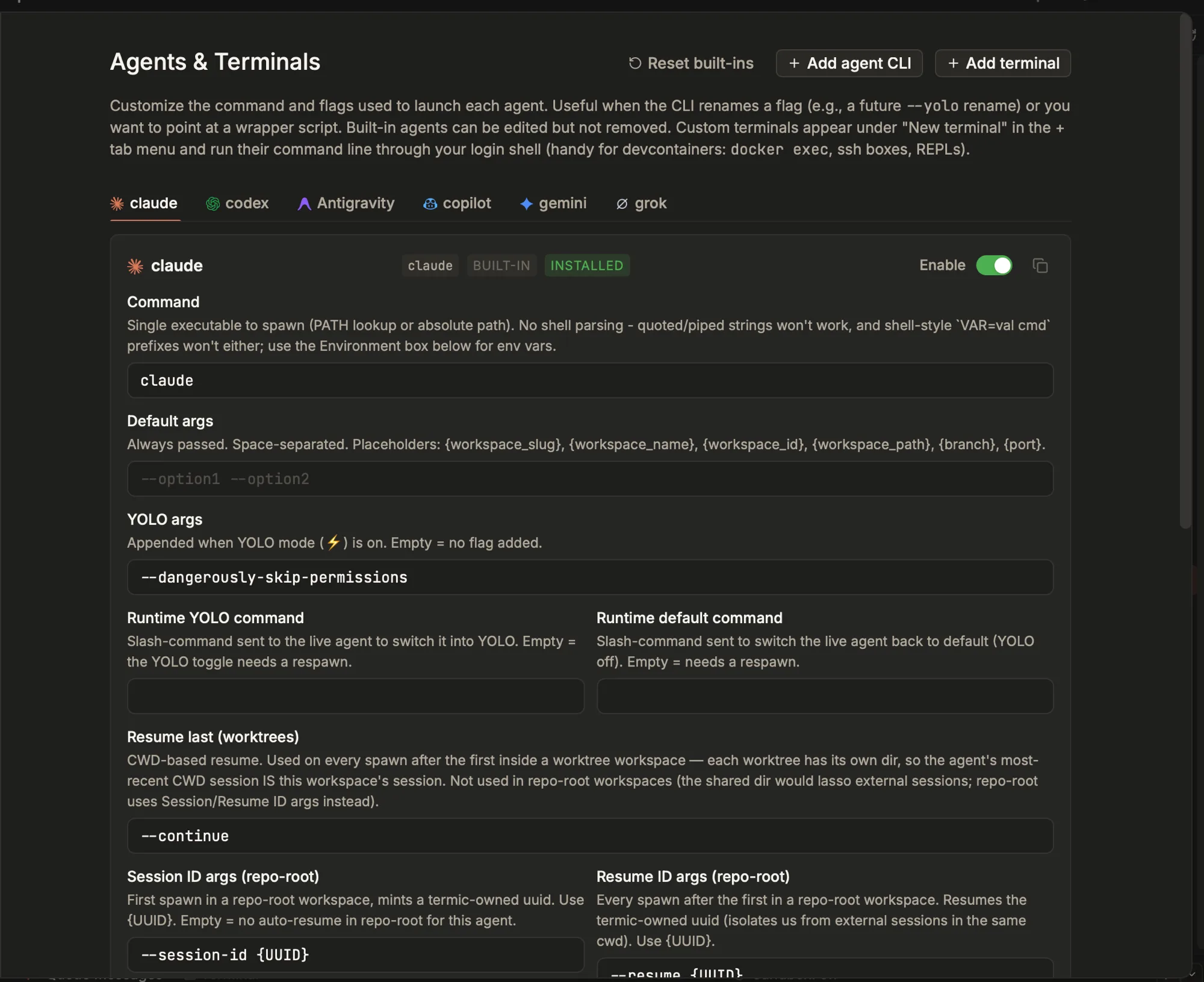
The agent registry: command, args, the YOLO flag and resume behavior for every built-in and any CLI you add. Reset built-ins, add an agent, or add a custom terminal from the top.
Once registered, your custom agent appears everywhere the built-ins do: the new-task picker, the new-tab menu, the prompt destination picker, and as a selectable default CLI.
Custom commands and plain terminals
Sometimes you don’t want an agent at all, you want a specific tool launched against your repo. The project menu’s Custom command option opens the repo’s current branch and runs a command of your choosing in a terminal tab: an ssh session, a dev server, a REPL, k9s --context=.... The command runs in a login shell and drops back to a usable shell when it exits, so you can keep working in the tab afterward. It’s how people keep, say, every Kubernetes cluster one click away in the sidebar.
There’s also a plain Terminal entry that just opens the repo in a shell tab, no agent involved.
Work-done detection per agent
Termic detects when an agent finishes a turn from the signals the CLI emits (see Work-done & notifications). The built-ins have tuned classifiers. A custom CLI might emit output that trips a false “done”, so each agent has a Work-done detection toggle in Settings → Agents to turn it off for that agent. Agents that emit no status signals at all show an attention bell instead of a done dot, because “finished” and “waiting for input” can’t be told apart without a signal.
Agent hooks: let the agent say it, instead of guessing
Reading state off the terminal is usually right, and wrong in the way that costs most. Claude paints its idle glyph while it is blocked on a permission prompt, and again while its background agents are still running. Measured over an 8.5 minute run with four subagents, the title claimed idle for 154 seconds, 30% of the time the work was still outstanding.
Agent hooks close that. Termic installs a small script into the agent’s own config so the agent reports its own turns: started, needs you, done. Settings, Agents & Terminals, in the Agent hooks row above the per-agent tabs.
Each agent gets the events it actually has, which is not the same set:
| Agent | Ready | Working | Needs you | Done |
|---|---|---|---|---|
| Claude | yes | yes | yes | yes, guarded so background tasks do not read as finished |
| Codex | yes | yes | yes | yes |
| Grok | — | yes | yes | yes, and it is the only one that reports an interrupt |
| Antigravity | — | yes | no such event, so the permission prompt is read from the screen | yes |
| opencode | — | yes | yes | yes |
Four things worth knowing before you turn it on:
- Off by default, and marked Experimental. It writes to your agent’s own config, so it asks first.
- It shows you the exact scripts and config before writing anything, and removal puts your config back byte for byte.
- It installs globally, one agent at a time, not per project.
- It works the same sandboxed, in Docker, and unsandboxed.
Codex is a special case worth knowing about: its hooks do not run until they are trusted, so a config that looks installed can still be silent. Termic handles the trust step as part of the install.
Several logins for one agent
An agent can hold more than one credential set: a work subscription and a personal one, say. Each task picks which it runs as, and a task that is mid-conversation can be moved to the other without losing it. Termic never handles the credential itself, and not every agent can do this honestly. See several accounts per agent for the per-agent answer.
Default agent
Each project has a default CLI, used when you open a task without explicitly picking one. The Terminal fallback is always in the list, so a project is never stuck without something to launch.
Related
- Work-done & notifications: how Termic knows an agent is done.
- Sandbox overview: running agents unattended, safely.
- Settings reference: where the registry lives.
- Several accounts per agent: a second subscription per agent.
- Profiles: a separate registry per profile.