The chip in a task’s footer says how much of the current agent’s subscription you have spent: the rolling session window, the rolling weekly one, and a bar that follows whichever is closest to its limit. Click it for the reset times, the running cost, and the account switcher.
It costs you nothing. Both agents already report this to their own interface, and Termic reads what they report rather than asking a provider.
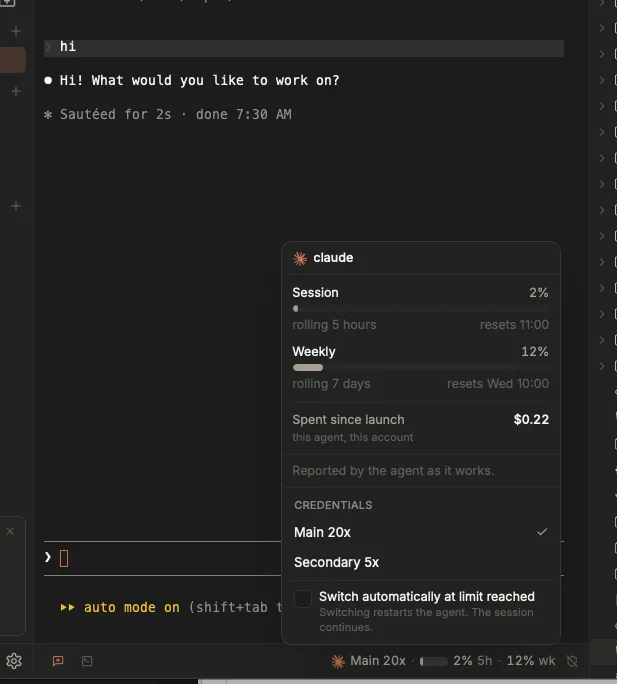
The whole readout, in one panel: the two windows, what the account has cost, and which account the numbers belong to.
The two numbers are not context usage
That is the natural misreading. These are the two rolling windows a subscription enforces: the short session window and the long one. Context usage is a different number about a different thing, and it is not what this shows.
The bar turns amber past 70% and red past 90%, following whichever window is nearest its limit, because a comfortable five-hour figure sitting in front of a nearly spent week is the case that catches people out.
What it costs, and how the numbers arrive
- Claude pipes its rate limits into whatever command holds its status line slot, on every turn, piggybacked on a response it was already receiving. Termic installs a script into that slot which prints nothing and reports the numbers out the side. Reading it spends no request and no rate-limit budget.
- Codex is asked directly, about once every two minutes, for the visible task only.
Claude’s half needs agent hooks turned on, because the status line is installed by the same action. No other agent has a measured source, so no other agent shows a chip.
Dollars, and accounts with no plan
The popover always carries what the current account has spent since Termic launched, from the agent’s own reporting. It resets when Termic does, which is said on the panel itself, because someone comparing it against a provider dashboard needs to know that before they trust it.
On an account with no subscription (an API key, Bedrock, Vertex, an enterprise seat) there are no rolling windows at all, so percentages would be meaningless. That is exactly the account the dollar figure exists for, and there it appears on the footer chip itself rather than only in the panel.
If the chip stays empty
Two causes, in order of likelihood.
A session that was already running. Claude reads its settings once, at session start, so a tab that was open when the status line was installed keeps running without one for the rest of its life. This presents as “it worked and then it stopped”: new tasks show a chip, the tab you have had open all afternoon never does. Restarting that tab is the whole fix.
Something else owns the status line slot. A configuration has exactly one status line, and Termic claims it only when it is free. If a project ships its own, or you wrote your own, Termic leaves it alone and gets nothing. Rather than showing an empty chip, it names what is holding the slot and where, and offers a prompt you can hand to the agent that owns that script.
A project’s status line beats your user-level one, which is the version that confuses people: the same account reports usage in one repository and not in another.
Adding the reporting to a status line of your own
If you would rather edit the script yourself than hand a prompt to an agent, this is the whole contract.
Read from the JSON Claude sends on stdin:
| Field | Meaning |
|---|---|
rate_limits.five_hour.used_percentage | 0-100 |
rate_limits.seven_day.used_percentage | 0-100 |
rate_limits.five_hour.resets_at | Unix epoch seconds |
rate_limits.seven_day.resets_at | Unix epoch seconds |
cost.total_cost_usd | dollars, may have decimals. Nested under a top-level cost object, not at the top level |
Then, only when both TERMIC_PTY and TERMIC_TASK_ID are set, write exactly this to the file named by $TERMIC_PTY, with no trailing newline:
\033]777;notify;termic;usage <5h> <7d> <5hResetsAt> <7dResetsAt> <costUsd>\007for example:
\033]777;notify;termic;usage 58 41 1788530400 1788937200 0.2231\007Five rules, each of which is the difference between working and silently not:
- Write
-for any value that is missing or is not a number. Never0, which reports a spent limit as unused or a real cost as free. - Plain decimals only. Termic rejects anything that is not
^\d+(\.\d+)?$, so a%g-style format is a trap: it renders an epoch as1.78853e+09and the whole reading is dropped in silence. - Stay silent only when the percentages and the cost are all missing. A script that says nothing unless it sees a percentage reports nothing, ever, on an account with no subscription, which is precisely where the cost is the only reading there is.
- Print nothing extra on stdout. Whatever the script prints is what renders under the input box, every turn, so the sequence goes to
$TERMIC_PTYand nowhere else. - Swallow every error. A status line that raises is one you watch fail on every turn.
The cost field’s path is the single easiest thing to get wrong here. It sits inside a top-level cost object alongside total_duration_ms and the line counts, so reading payload["total_cost_usd"] finds nothing and reports no cost for ever, on every account. Measured against Claude Code 2.1.250.
The environment guard is what makes this a complete no-op for anyone not running under Termic, including teammates and CI.
A Python drop-in
Paste this into your script and call it with the parsed payload before you print anything.
def report_to_termic(payload: dict) -> None:
    """Report Claude's plan usage to Termic. No-op outside Termic.

    `payload` is the status line JSON Claude sends on stdin, already parsed.
    Never raises, never prints: stdout IS the status line.
    """
    import os

    try:
        pty = os.environ.get("TERMIC_PTY")
        if not pty or not os.environ.get("TERMIC_TASK_ID"):
            return

        def num(v):
            # "-" for anything missing or non-numeric. NEVER 0: that would
            # report a spent limit as unused, or a real cost as free.
            if isinstance(v, bool) or not isinstance(v, (int, float)):
                return "-"
            # Plain decimal only, never exponent notation.
            if isinstance(v, int) or float(v).is_integer():
                return str(int(v))
            return repr(float(v))

        limits = payload.get("rate_limits") or {}
        five = limits.get("five_hour") or {}
        seven = limits.get("seven_day") or {}

        fields = [
            num(five.get("used_percentage")),
            num(seven.get("used_percentage")),
            num(five.get("resets_at")),
            num(seven.get("resets_at")),
            num((payload.get("cost") or {}).get("total_cost_usd")),
        ]
        # Cost ALONE is a valid reading, and is the only one an account with
        # no subscription ever has.
        if fields[0] == "-" and fields[1] == "-" and fields[4] == "-":
            return

        body = "\033]777;notify;termic;usage " + " ".join(fields) + "\007"

        # Three targets in order: $TERMIC_PTY is a host path a Docker-sandboxed
        # agent cannot see, /proc/1/fd/1 is the container's own stdout, and
        # /dev/tty is a last resort that usually fails.
        for target in (pty, "/proc/1/fd/1", "/dev/tty"):
            try:
                with open(target, "w") as fh:
                    fh.write(body)
                return
            except OSError:
                continue
    except Exception:
        return
Wire it up:
data = json.load(sys.stdin)   # whatever you already do
report_to_termic(data)        # add this
print(your_status_line)       # unchanged
Then restart the tab, for the reason in the section above: Claude reads its settings once, at session start.
Switching accounts before you run out
Once an agent holds more than one login, the same panel offers to move the task to an account with room, and can do it on its own past 95% of a rolling window. See several accounts per agent.
Related
- Several accounts per agent: a second subscription, and switching to it at the limit.
- Work-done & notifications: agent hooks, which Claude’s half of this rides along with.
- Agents & the registry: which agents report what.