A profile is a fully separate instance of Termic: its own window, its own projects, its own tasks and its own settings. Two profiles can be open on two monitors at the same time, and neither can see the other’s work. Nothing is shared between them except the app itself.
The obvious use is a work profile and a personal one, so a client repository never appears in a screen share of your side project, and an agent started in one has no path to the other. The same shape covers a machine used by two people, or one used for two clients who should not appear in each other’s task lists.
Profiles shipped in 1.3.0.
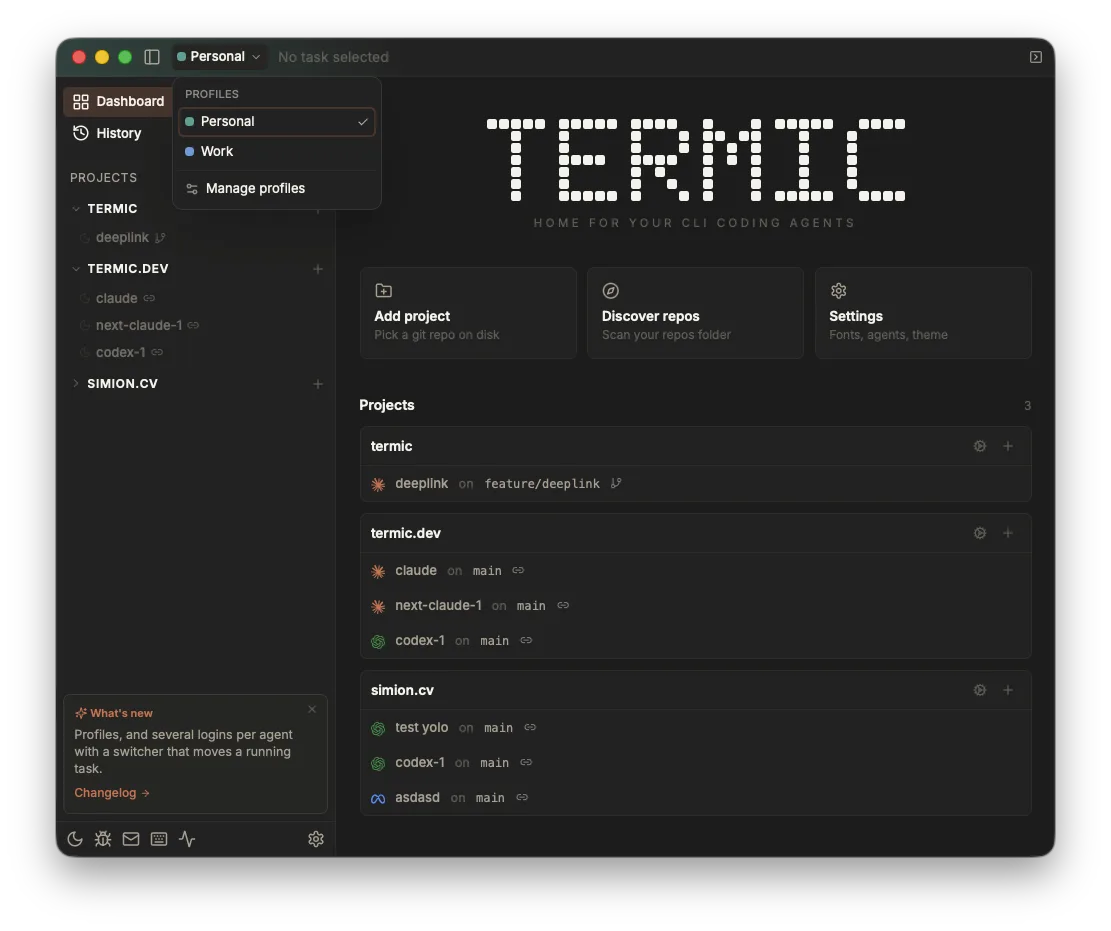
The chip in the title bar names the profile you are in. Switching opens that profile’s own window.
Dormant until you ask for one
Termic has no profiles until you create one, and this is not a default that can be flipped: there is no registry file on disk, the title bar shows nothing, and the app behaves exactly as it did before. Almost every install stays here forever, and a feature about isolation should cost nothing to the people who do not need it.
Create the first one in Settings, Profiles. It asks for two names in one step: a name for the setup you already have, and a name for the new one. That pairing is deliberate. Your existing projects, tasks and settings become a profile in place, they do not move on disk and nothing is copied, so the first profile is a label on what already works rather than a migration.
Turning profiles off keeps every byte. The app returns to a single window and the profile directories stay where they are, so nothing is deleted and nothing has to be re-imported if you turn it back on.
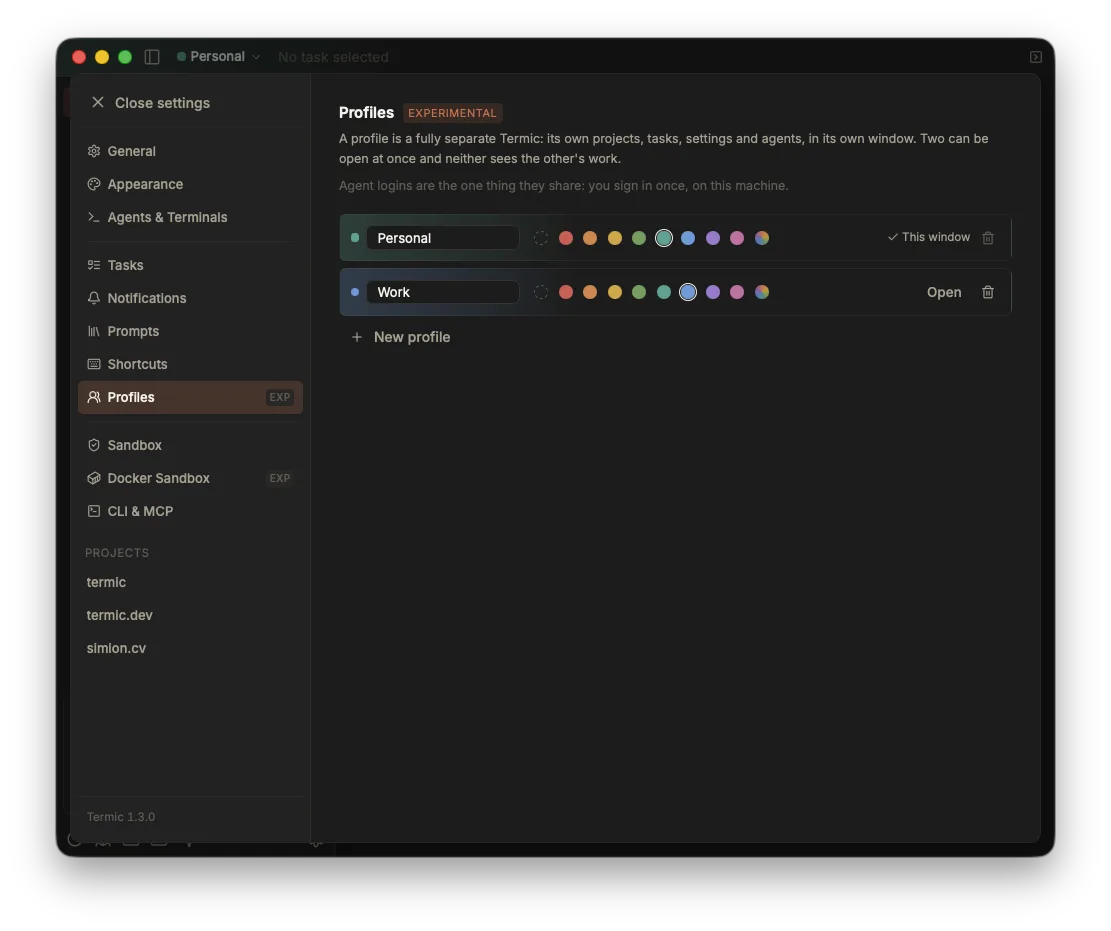
Settings, Profiles. Each one takes a name and an accent, or no accent at all, and opens in its own window.
What each profile owns
| Per profile | Shared by the machine |
|---|---|
| Projects | The app and its updates |
| Tasks and their worktrees | Downloaded language servers |
| Settings, including the agent registry | The Docker image Termic builds |
| Scratchpad notes | The CLI and MCP tokens |
| Which agent account is the default | Agent logins themselves (see below) |
Your first profile keeps the existing data directory as-is; every later one gets its own directory beside it. That is what makes the feature migration-free: there is no import step and no moment where your tasks live somewhere new.
The window is the boundary
Each profile is a real window, not a tab or a picker. That is the point: the isolation you can see is the isolation you get, and there is no state where the wrong profile’s task is one stale click away.
- The title bar carries a chip with the profile’s name and its accent colour, so a screenshot is self-identifying.
- Each profile can take an accent colour, which tints its window, or no accent at all if you would rather every window look the same.
- Closing a profile’s window closes that profile. Quitting Termic remembers which profiles were open, and reopens exactly those the next time you launch.
- The macOS tray menu lists tasks grouped by profile, so it stays useful once there is more than one.
Names are frozen on purpose
A profile’s name becomes a directory name and part of the path to every worktree under it. Several agents key a resumable conversation to its working directory, so renaming a profile would move those worktrees and orphan every conversation in them.
Rather than offer a rename that quietly costs you your sessions, Termic freezes the name at creation. Deleting and recreating is the honest way to change it, and it is explicit about what that costs.
Agent logins across profiles
Profiles scope which agent accounts they offer and which one is the default. They do not scope the logins themselves, because a login is a fact about the machine.
Two profiles that both use an account called “Work” address the same login, so signing in once in either is enough. Nothing is copied, synced or selected: they resolve to the same place. See several accounts per agent for how that works and what it means when you want the two profiles genuinely signed in as different people.
Deleting a profile
Deleting asks you to type the profile’s name, because the action removes its projects, its settings and every task and worktree under it. A profile with running agents refuses to go until they are stopped.
You cannot delete the profile whose window you are in. Switch to another one first, which is also the only arrangement where the confirmation is meaningful: the window you are looking at is not the thing being removed.
The CLI and MCP
The termic CLI and the MCP endpoint are machine-wide, not per profile. A command that names a task by id finds it wherever it lives, because a task carries its own profile with it. A command that creates something, or lists everything, is the case where the profile matters, and those take it explicitly rather than guessing from whichever window happens to be focused.
Linux and Windows
Profiles are not macOS-only. The window, the data layout and the isolation are all cross-platform; the tray grouping follows whatever the platform’s tray supports.
Related
- Several accounts per agent: a second subscription per agent, and how profiles pick which one they use.
- Tasks & worktrees: what a profile is holding.
- Settings reference: where the Profiles section lives.
- Sandbox overview: the cage around an agent, which is per task and applies inside every profile.